Introduction
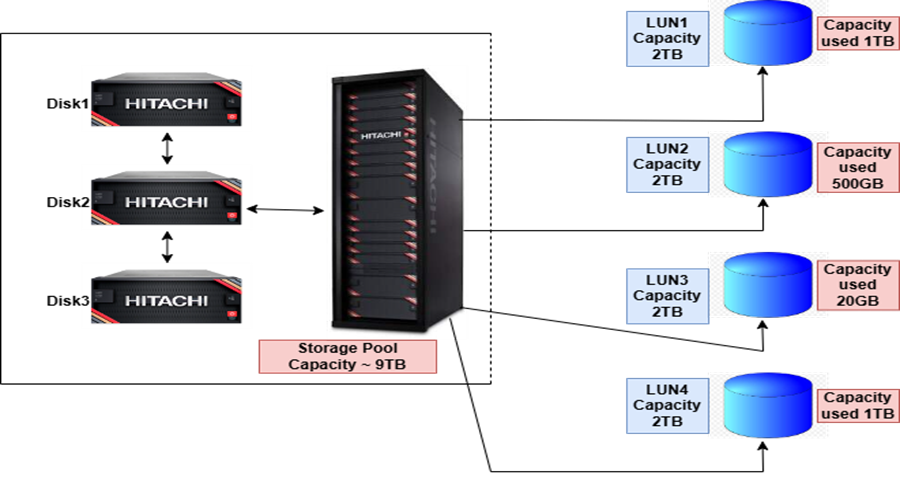
Data is a critical asset, and as data volumes increase, additional storage space becomes essential. By combining disks of varying capacities, such as 1TB, 3TB, and 5TB, you can create a storage pool with a total capacity of 9TB. On this pool, you can allocate multiple virtual chunks of different sizes for writing data. These chunks reserve their full capacity, even if no data resides on them. This concept is known as thick provisioning.
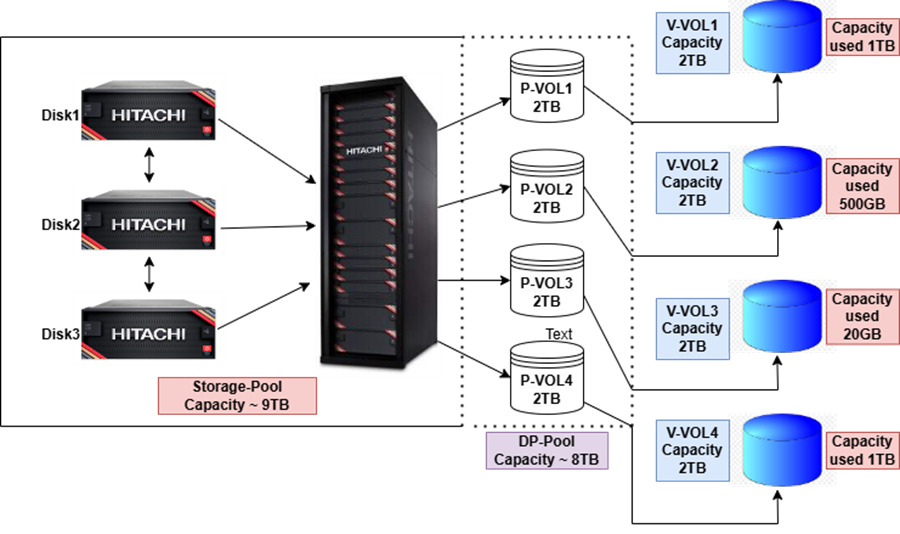
Dynamic Provisioning Pool (DP-Pool) or thin provisioning addresses this limitation by dynamically allocating storage capacity based on actual data usage.
Thick Provisioning versus Thin Provisioning
Thick Provisioning
Thick provisioning reserves the full storage capacity upfront during LUN creation, regardless of usage. While this approach enhances performance, it limits space availability and flexibility, requiring additional steps for resizing.
Example: The following screenshot shows a storage pool with a capacity of 9TB containing four thick LUNs, each of 2TB, reserving 8TB of space. However, the actual capacity used by all the virtual volumes (V-VOLs) is around 2.53TB. If the total data usage is only 2.53TB, 5.47TB of storage remains unused and wasted.
Thin Provisioning
Thin provisioning allocates storage dynamically, reserving space only when data is written. While this method introduces performance overhead during write operations, it optimizes space usage and allows easier scalability.
Example: The following screenshot shows a DP-Pool with an 8TB capacity contains four V-VOLs, each of 2TB. Initially, it does not block any storage space. However, the total capacity used by all the V-VOLs is around 2.52TB. If the total data usage is 2.52TB, the pool uses only this capacity without blocking the remaining space.
Steps to Create a DP-Pool Using CCI
What is CCI?
The CCI (Command Control Interface) is software used for configuring and managing Hitachi RAID storage systems. It provides a unified interface for storage management, allowing users to perform tasks such as monitoring, configuration, and management.
DP-Pool Creation Procedure
To create a Dynamic Provisioning Pool and map LUNs to host groups through required storage ports, complete the following steps:
1. Get Parity Group Information: Retrieve details of parity groups associated with the storage, including their available capacities. Use these parity group IDs to create basic LDEVs for forming the pool volume.
Syntax: To retrieve information about a parity group by specifying the HORCM_ID, run the following CCI command:
# raidcom get parity_grp <horcm_instance>

Key Output Fields:
-
- T: Displays the type of volume group, where R represents the parity group
- GROUP: Displays of the parity group
- Num_LDEV: Displays the LDEV number assigned to this parity group
- U (%): Displays the usage rate
- AV_CAP(GB): Displays the free space of the parity group
- R_LVL: Displays the RAID level
- R_TYPE: Displays the RAID type
2. Get Undefined LDEVs: Retrieve IDs of undefined LDEVs that are not assigned to any host groups or pools.
a. Syntax: To retrieve a list of undefined LDEV IDs number in decimal form, run the following CCI command:
# raidcom get ldev -ldev_list undefined <horcm_instance> | grep 'LDEV :' | head <num_of_LDEVs_required>

b. Syntax: To retrieve a list of undefined LDEV IDs number in hexadecimal form, run the following CCI command:
# raidcom get ldev -ldev_list undefined <horcm_instance> -fx | grep 'LDEV :' | head <num_of_LDEVs_required>

The screenshots show the output of an undefined LDEV IDs, used to create an LDEV from a specified parity group.
3. Create and Format LDEVs: Add LDEVs to a specified parity group and allocate storage capacity to associate with a DP-Pool.
When creating a pool with large capacity, create multiple LDEVs across different parity groups to enhance performance. If the storage system includes only one parity group, then create multiple LDEVs and associate them with that group.
a. Syntax: To create an LDEV, run the following command:
# raidcom add ldev -parity_grp_id <parity_grp_id> -ldev_id <undefined_ldev_id> -capacity <size_in_blocks_or_bytes> <horcm_instance>
In this command:
-
-
- Specify the capacity in bytes or blocks.
- For bytes, include units such as t/T (terabyte), g/G (gigabyte), m/M (megabyte), or k/K (kilobyte)
- For blocks then omit the unit.
- Provide the LDEV ID in either decimal or hexadecimal format.
The following screenshot shows two basic LDEVs of 255 GB each created using the decimal format of LDEV ID:

The following screenshot shows two LDEVs of similar capacity created using the hexadecimal format:

b. After creating basic LDEVs, format them because they remain in a blocked state until formatted, as shown in the following screenshot:
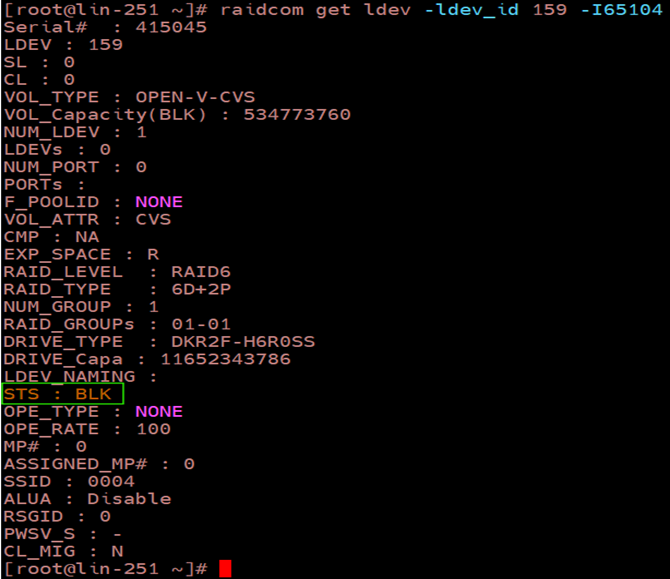
c. Syntax: To format the LDEV, run the following command:
# raidcom initialize ldev -ldev_id <ldev_id> -operation fmt <horcm_instance>
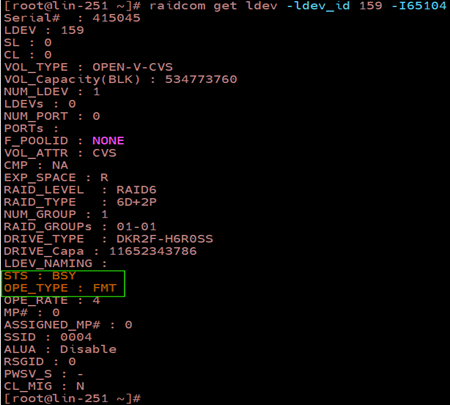
Formatting the LDEV for initialization takes time. During this operation:
-
-
- The STS status changes to BSY
- The OPE_TYPE changes to FMT, as shown in the following screenshot:
After formatting is complete successfully:
-
-
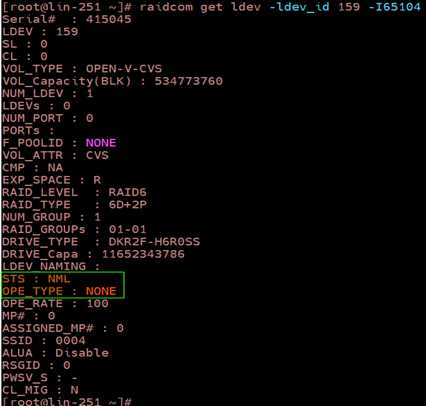
- The STS status reverts to NML
- The OPE_TYPE changes to NONE, as shown in the following screenshot:
Note: Assign a name to the created LDEV for clarity. While optional, naming improves manageability.
d. Syntax: To assign a name to the LDEV, run the following command:
# raidcom modify ldev -ldev_id <ldev_id> -ldev_name <suitable_name> <horcm_instance>

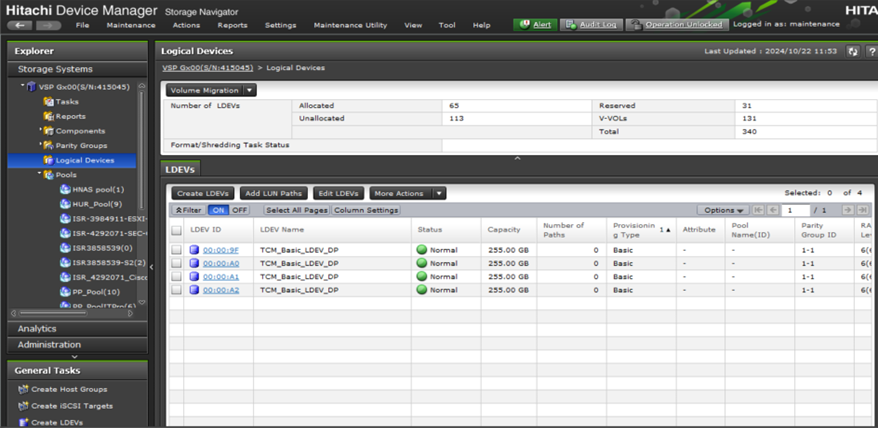
Basic LDEVs are created using CCI and can be verified from SVP, as shown in the following screenshot:
4. Get Pool Information: Retrieve details of existing pools associated with Thin Image, Dynamic Provisioning, Dynamic Provisioning for Mainframe, and other features that belong to the storage system and then assign an LDEV to the required pool using the Pool ID.
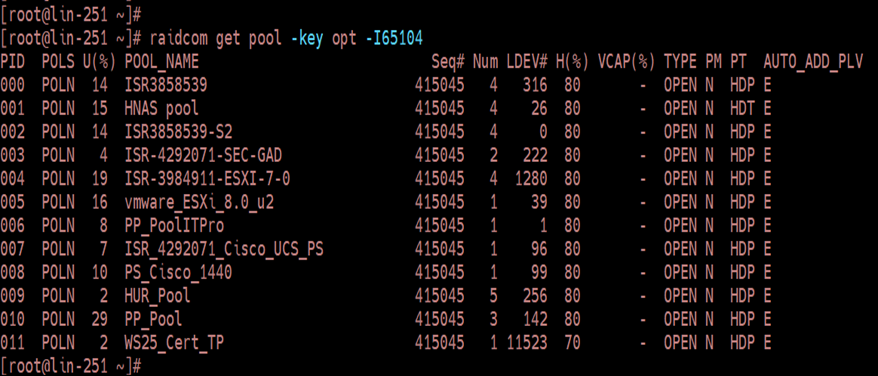
Syntax: To retrieve pool information, run the following command:
# raidcom get pool -key opt <horcm_instance>
Key Output Fields:
-
- PID: Displays the pool ID
- POLS: Displays the pool status
- POLN: Pool in normal state
- POLF: Pool is full
- POLS: Pool in suspend state
- POLE: Pool in failure state
- U (%): Displays the pool usage rate
- POOL_NAME: Displays the pool name
- Num: Displays the number of LDEVs composing the pool
- LDEV#: Displays the first LDEV number used to create a pool
- H (%): Displays the pool threshold
- TYPE: Displays the pool platform type where OPEN denotes Dynamic Provisioning Pool
- PM: Displays the pool status where N denotes it is in Normal state
- PT: Displays the type of pool
- HDP: Pool for Dynamic Provisioning
- HDT: Pool for Dynamic Tiering
5. Creating a DP-Pool: Create a Dynamic Provisioning Pool of 1.02 TB by associating LDEVs with the pool from step 3.
If the pool already exists, additional LDEVs are added to the existing pool volume.
Syntax: To create a DP-Pool using LDEV number and pool name, run the following command:
# raidcom add dp_pool -pool_name <dp_pool_name> -ldev_id <ldev_num> <horcm_instance>
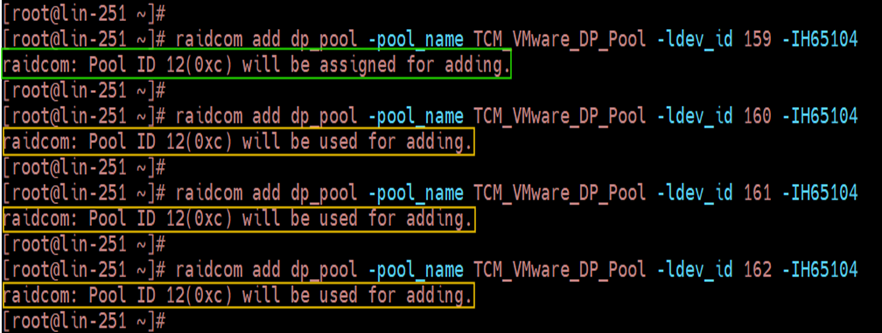
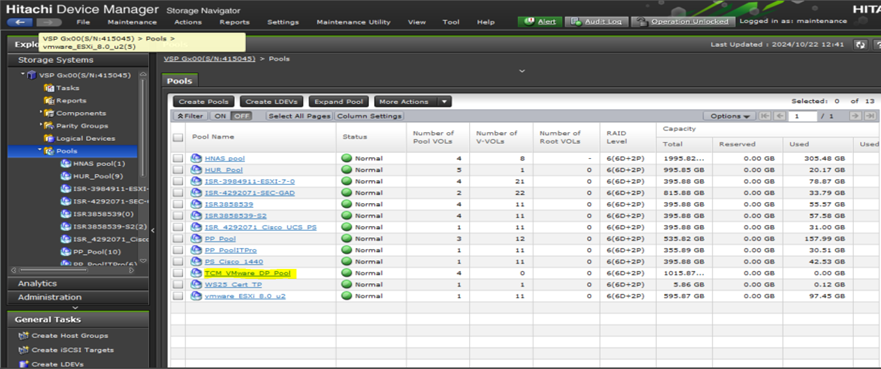
A pool named “TCM_VMware_DP_Pool” is created using LDEV ID 159 and assigned with a PID (Pool ID) of 012. When the same command runs with distinct LDEV IDs, instead of creating a new pool, the volume is assigned to the existing pool, as shown in the following screenshot:
The DP-Pool created using CCI is verified using SVP, as shown in the following screenshot:
6. Create V-VOLs for the DP-Pool: Create V-VOLs within the DP-Pool using undefined LDEV numbers. Numerous V-VOLs can be created if the DP-Pool has sufficient available space.
a. Syntax: To create V-VOLs using pool ID, LDEV ID, and capacity, run the following command:
# raidcom add ldev -pool <pool_id> -ldev_id <ldev_id> -capacity <capacity_in_blocks_or_bytes> <horcm_instance>
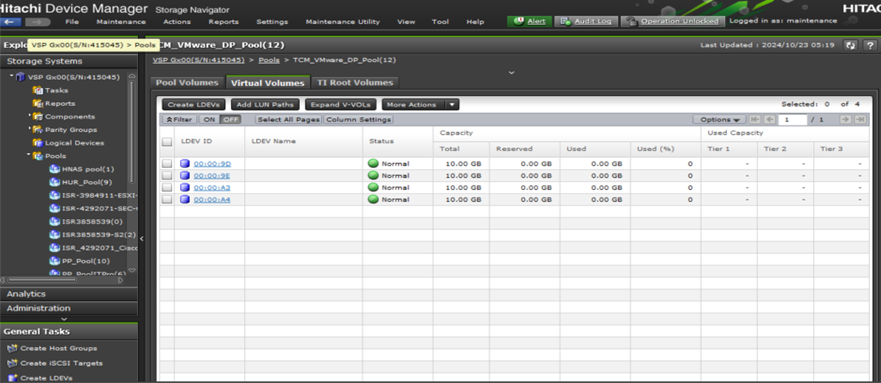
The following screenshot shows four V-VOLs, each with a capacity of 10GB, have been created. To assign names to these V-VOLs, use the raidcom modify command used in step 3.

b. Verify the V-VOLs in SVP created using CCI, as shown in the following screenshot:
c. Syntax: To list all unmapped V-VOLs from the DP-Pool, run the following command:
# raidcom get ldev -ldev_list unmapped -key front_end <horcm_instance> | awk '$6==<caps_in_block> && $7 == <pool_id> && $8 ~ <attribute_type>'
In this syntax:
-
-
- $6 represents the volume capacity.
- $7 represents Pool ID (PID).
- $8 represents the attribute type.
The unmapped V-VOLs are listed in the following figure, indicating that they are not mapped or do not have a Logical unit (LU) path specified.

Summary
The Dynamic Provisioning Pool offers flexibility, high performance, and efficient space utilization. Pools can be expanded on-the-fly to address capacity shortages. V-VOLs created within the DP-Pool consume pool capacity only when data resides on them or during ongoing I/O operations. Creating a DP-Pool using CCI enhances efficiency compared to performing the same task through SVP.