As enterprise Kubernetes deployments continue to scale, aligning infrastructure limits across compute, storage, and orchestration layers becomes critical. In environments combining Red Hat OpenShift Container Platform (RHOCP), Cisco Unified Compute System (UCS), and Hitachi Virtual Storage Platform (VSP) with Hitachi Container Storage Interface (CSI), Logical Unit Number (LUN) scalability and pod density are tightly coupled variables that directly impact performance, stability, and operational predictability. This blog outlines key configuration limits and design considerations to help ensure a balanced, scalable deployment.
Cisco UCS Virtual Interface Card (VIC) FC-Adapter Policy
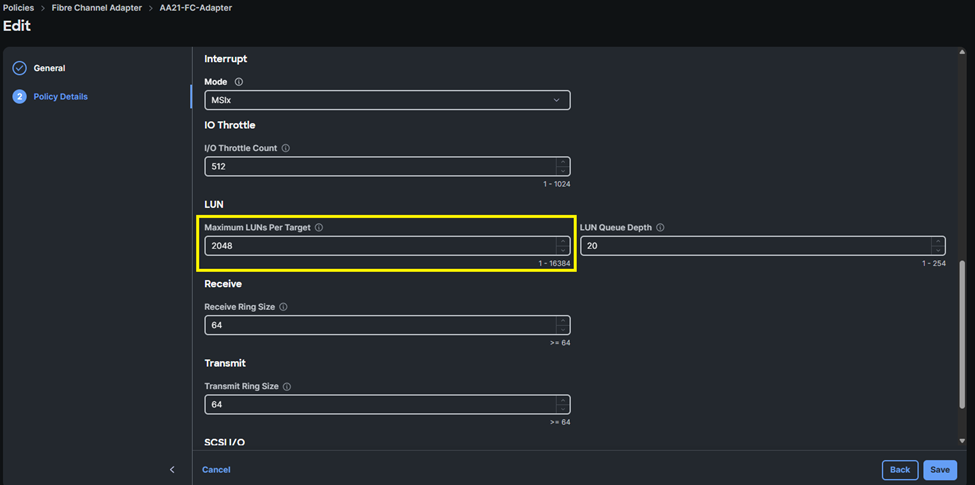
Within Cisco UCS environments, the Fibre Channel (FC) Adapter Policy defines the Maximum LUNs per Target. By default, this value is set to 1024, with a supported maximum of 16384. As best practice, it is recommended to set a value of 2048 to align with Hitachi CSI LUN limits.
Host Operating System Max LUN Settings
For Red Hat Enterprise Linux (RHEL) and Red Hat CoreOS (RHCOS), the default maximum number of LUNs per host is 512, with a supported upper limit of approximately 65,536 LUNs. These limits can be modified via machine configuration. It is recommended to align this value with the Maximum LUNs per Target value of the Cisco UCS FC-Adapter Policy. The following is an example YAML worker-ucs-max-luns-2048.yaml machine config to modify scsi_mod.max_luns for RHCOS Master and Worker nodes:
Note: Master configurations will only be required if running workloads on master node types.
Worker
apiVersion: machineconfiguration.openshift.io/v1
kind: MachineConfig
metadata:
name: worker-scsi-max-luns
labels:
machineconfiguration.openshift.io/role: worker
spec:
kernelArguments:
- scsi_mod.max_luns=2048
config:
ignition:
version: 3.2.0
Master
apiVersion: machineconfiguration.openshift.io/v1
kind: MachineConfig
metadata:
name: master-scsi-max-luns
labels:
machineconfiguration.openshift.io/role: master
spec:
kernelArguments:
- scsi_mod.max_luns=2048
config:
ignition:
version: 3.2.0
These parameters directly influence the host’s ability to discover and manage storage devices presented from the SAN.
RHOCP Max Pod Density Considerations
In RHOCP, the default maximum number of pods per node is 250, which may be increased depending on node sizing and resource availability. The following is an example YAML node-max-pods.yaml machine configuration to modify maxPods for RHCOS Master and Worker nodes:
Note: Increasing pod density requires careful validation of CPU, memory, and network capacity—not just storage.
Note: Master configurations will only be required if running workloads on master node types.
Worker
apiVersion: machineconfiguration.openshift.io/v1
kind: KubeletConfig
metadata:
name: set-max-pods
spec:
machineConfigPoolSelector:
matchLabels:
pools.operator.machineconfiguration.openshift.io/worker: ""
kubeletConfig:
maxPods: 2500
Master
apiVersion: machineconfiguration.openshift.io/v1
kind: KubeletConfig
metadata:
name: set-max-pods
spec:
machineConfigPoolSelector:
matchLabels:
pools.operator.machineconfiguration.openshift.io/master: ""
kubeletConfig:
maxPods: 2500
Because each pod may consume one or more Persistent Volume Claims (PVCs), increases in pod density can significantly impact overall LUN consumption.
For additional details about managing the maximum number of Pods refer to: ttps://docs.redhat.com/en/documentation/openshift_container_platform/4.21/html/nodes/working-with-nodes#nodes-nodes-managing-max-pods
Hitachi CSI (HSPC) Driver Considerations
The Hitachi CSI enforces a configurable limit on the number of LUNs through the SPC_LUN_MAX parameter.
- Default value: 256
- Maximum supported value: 2048
You can update the LUN configuration by modifying the SPC_LUN_MAX parameter. By default, 256 LUNs are supported. However, you can update the value for the SPC_LUN_MAX parameter to 2048. To change this parameter, follow steps from the Storage Plug-in for Containers Quick Reference Guide section Editing the existing LUN configuration.
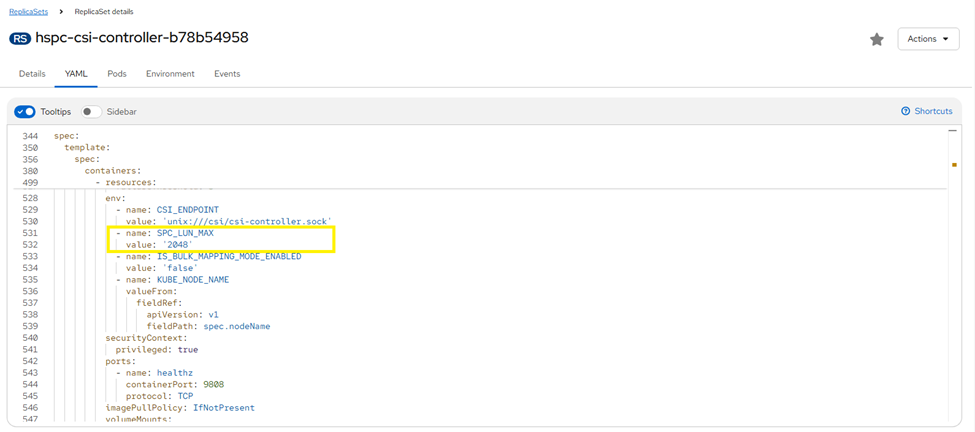
This setting governs the number of volumes that can be provisioned and attached through the CSI driver to a Hitachi VSP host group and is commonly the first constraint encountered in scaled environments.
Storage Design Recommendations
Best practices recommend aligning configuration limits across all layers of the stack to ensure consistent scalability and to prevent resource bottlenecks:
- Ensure that LUN limits are understood based on forecasted PVC density per node:
- Avoid mismatched configurations where a lower limit in one layer restricts overall scalability.
- Plan pod density in conjunction with storage limits to ensure sufficient capacity for PVC provisioning.
- VSP Port and Host Group Limitations by generation:
- Once the SPC_LUN_MAX limit is reached based on Hitachi CSI settings, it is recommended to provision an alternate Storage Class that maps to different Hitachi VSP storage ports. This enables continued LUN provisioning by distributing workloads across additional front-end ports. Ensure that the number of VSP ports that the number of VSP ports provisioned are based on the hard limits within the Hitachi CSI and the above table. For further information on performance considerations when using multiple Storage Classes within a RHOCP cluster, refer to Improving Volume Provisioning Performance at Scale within CSI for VSP One Block Best Practices Guide.
- Hitachi VSP systems must be provisioned with the appropriate MPUs and Channel Boards to meet scalability requirements based on Pod and PVC per node density.
Summary
The effective LUN scalability within the environment is constrained by the lowest configured limit across the host OS, Cisco UCS infrastructure, or the Hitachi CSI driver. Proper configuration alignment across these components is required to support predictable scaling and stable operation in enterprise RHOCP deployments.
#Cisco-ValidatedDesign