Automating SAP HANA Full-Stack Installation by Hitachi Vantara
If you've ever been part of an SAP HANA deployment project, you already know the drill. The storage team carves out LUNs. The Linux team configures kernel parameters. The SAP Basis team downloads gigabytes of installation media, manually runs the installer, and hopes nothing breaks. It's a multi-day, multi-team effort, and somewhere in the middle, someone always misses a step.
What if you could hit one command and watch the whole thing deploy itself?
That's exactly what we built with the SAP HANA Full-Stack Installation Ansible Playbook Pipeline, a fully automated, end-to-end deployment solution built on Hitachi Vantara Advanced Server and VSP One Block Storage.
Why We Built This
In my earlier blog, Automating SAP HANA TDI Storage Provisioning with Ansible we automated the storage piece, dynamically provisioning LUNs, host groups, and ports on VSP One Block using the hitachivantara.vspone_block Ansible collection.
But storage is just the beginning. After the LUNs are provisioned, you still need to prepare the Python runtime environment on the HANA servers, format filesystems, tune the OS, download SAP media, and run the database installer. Each of those steps has its own set of requirements and failure points. So we went further and built a single pipeline that takes you from bare metal to a running SAP HANA database, with no manual touchpoints.
What the Pipeline Actually Does
The automation lives in the inside the hv-playbooks-sap Hitachi Vantara GitHub repository.
The core orchestrator is main_pipeline.yml, which stitches together six distinct Ansible roles in a sequential pipeline. The diagram below illustrates the complete end-to-end workflow, from storage provisioning all the way to the final HANA operational tasks.
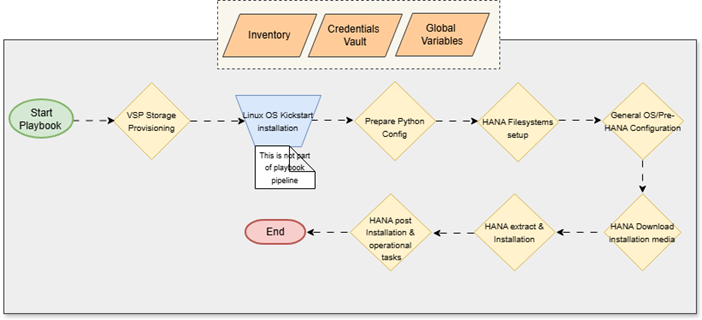
Note on the Workflow: The pipeline relies on three core inputs, the Inventory, Credentials Vault, and Global Variables to drive the automation. As shown in the diagram, the only manual step (or external process) is the bare-metal Linux OS Kickstart installation. Everything else, from carving the VSP One Block storage to downloading media and running the installer, is fully handled by the playbook pipeline.
Here is a breakdown of what happens at each stage of that workflow:
Stage 1: Python Environment Setup
Before any of the SAP roles can do their job, the HANA TDI servers need a properly configured Python runtime. This is a step that often gets overlooked, but without it, the subsequent roles that depend on Python libraries will simply fail.
The sap_hana_python_config role handles this cleanly with full multi-OS support.
After the packages land, it installs all required pip modules defined in the hana_python_modules variable using pip3.11 directly. This variable-driven approach means you can customize the module list per environment without touching the role itself.
Finally, the role runs a quick sanity check: it verifies that python3.11
--version returns successfully and prints the result using an Ansible debug task. If Python installation quietly fails for any reason, you know about it immediately rather than three stages later when a cryptic error surfaces.
Think of this stage as laying the foundation. Everything else in the pipeline depends on it.
Stage 2: Filesystem Configuration
Once the Python environment is ready, the sap_hana_filesystem_config role takes over.
The role auto-detects SAN disks dynamically assigned through Hitachi VSP Block storage: it scans block devices on the server, intelligently excludes the OS LUN (which carries partition tables), and identifies the raw LUNs presented by VSP One Block. It then formats them with XFS and mounts them to the correct SAP-standard paths:
· /hana/shared
· /hana/data
· /hana/log
No hardcoding disk names. No sda, sdb guesswork. The logic handles dynamic disk sizing for any platform, whether you're deploying on a small & mid-range VSP One VSP One .
Stage 3: General OS Preparation
With filesystems mounted, the pipeline moves to OS-level configuration using the sap_general_preconfigure role from the community.sap_install Ansible collection.
This role applies the baseline configuration:
· Setting hostname and /etc/hosts entries correctly
· Configuring time synchronization (NTP/chrony)
· Installing required RPM packages and disabling conflicting services
· Applying tuned profiles for SAP workloads
Think of it as getting the OS into a “SAP-approved” state before the database installer even runs.
Stage 4: Linux OS Tuning for SAP HANA
This stage goes deeper into performance tuning specifically for SAP HANA using the sap_hana_preconfigure role.
HANA is memory-intensive and has very specific kernel-level requirements. This role handles:
· Huge pages and transparent huge pages settings
· CPU frequency scaling and NUMA memory configuration
· Network stack tuning for high-throughput in-memory data transfers
· Kernel semaphore and shared memory parameters
Getting these parameters wrong is one of the most common reasons SAP HANA installations fail or underperform. Automating this eliminates that risk entirely.
Stage 5: SAP Media Download and Extraction
Before you can install SAP HANA, you need the actual installation media, and those are several gigabytes of files from the .
The sap_hana_download_extract_media role uses the SAP Launchpad API to programmatically download and extract the correct HANA version directly onto the server.
You don't store passwords in flat files. Instead, the pipeline uses vars_prompt to securely ask for your SAP S-User credentials at runtime. This means:
· No credentials sitting in vault files
· No risk of accidentally committing passwords to Git
· The pipeline prompts you once and handles the rest
All sensitive API calls are wrapped with no_log:
true so nothing leaks into Ansible logs.
Stage 6: SAP HANA Database Installation
The final stage runs the unattended SAP HANA installation using the sap_hana_install role.
Under the hood, it invokes hdblcm (SAP HANA Database Lifecycle Manager) with a fully generated response file that specifies:
· SID (System Identifier) and Instance Number
· HANA system and tenant database passwords
· Installation paths pointing to the previously mounted filesystems
· Component selection (server, client, etc.)
When this role finishes, you have a fully installed, running SAP HANA database ready for the Basis team to connect and configure.
The Complete Pipeline at a Glance
Here's the full six-stage pipeline mapped to roles and tags:
|
Stage
|
Role
|
Tags
|
Purpose
|
|
1
|
sap_hana_python_config
|
prepare_python, python_config
|
Install Python 3.11 + pip modules on HANA TDI nodes
|
|
2
|
sap_hana_filesystem_config
|
storage_fs, filesystem_config
|
Auto-detect SAN LUNs, format XFS, mount HANA paths
|
|
3
|
sap_general_preconfigure
|
general_preconfigure
|
SAP-certified OS baseline configuration
|
|
4
|
sap_hana_preconfigure
|
hana_preconfigure
|
HANA-specific kernel and memory tuning
|
|
5
|
sap_hana_download_extract_media
|
download_media, hana_download
|
Download & extract SAP HANA media via Launchpad API
|
|
6
|
sap_hana_install
|
hana_install, new_install
|
Run unattended hdblcm HANA installation
|
Before you run this pipeline, make sure you have the following ready:
· Hitachi Vantara Advanced Server provisioned and Fibre Channel (FC) connected to Fibre Switch
· VSP One Block storage array (B24, B26, B28, or B85 ) with FC connectivity
- Storage Provisioning and LUNs mapping from VSP One Block Storage to Hitachi Advanced Servers (HANA TDI nodes)
· RHEL 9.x or SLES 15.x installed on the HANA TDI nodes with SSH access
· Ansible 2.16+ on your ansible control node
· Internet access on HANA TDI nodes for yum/zypper and pip3.11 package downloads, or local repositories configured
· SAP S-User account with software download permissions
· LUN sizes – know the size of assigned LUNs for HANA filesystems like data, log, shared as per memory configurations
· Credentials for HANA server SSH access and sidadm user account used during HANA installation
Note: The OS pre-configuration, SAP HANA pre-configuration, and SAP HANA installation steps in this pipeline rely on SAP community-maintained Ansible content (not custom Hitachi roles). These are consumed via the following Ansible Galaxy collections: community.sap_install (SAP OS + HANA preconfigure/install roles), community.sap_launchpad (includes the software_center_download module for SAP media download), and community.sap_libs (shared low-level SAP modules used by sap_install).
Running the Full Pipeline
First, bootstrap your Ansible control node environment by installing the required Galaxy collections:
ansible-galaxy collection install -r requirements.yml
Then run the complete pipeline:
ansible-playbook -i inventory/hana_nodes.ini main_pipeline.yml --vault-password-file vault_pass.txt
Note: You can add the vault password in the file vault_pass.txt as plain text, or provide the password on the prompt when asked.
The playbook will prompt you for your SAP S-User credentials and then execute all stages automatically.
Running Only the Python Stage
If you're troubleshooting a fresh server that's missing Python dependencies, you can run just Stage 1 in isolation:
ansible-playbook -i inventory/hana_nodes.ini main_pipeline.yml --vault-password-file vault_pass.txt --tags "prepare_python"
Skipping Already Completed Stages
Already done with Python config and filesystem setup? Jump straight to OS preparation:
ansible-playbook -i inventory/hana_nodes.ini main_pipeline.yml --vault-password-file vault_pass.txt --skip-tags "prepare_python,storage_fs"
Securing Credentials with Ansible Vault
Sensitive passwords like your HANA node SSH password and the sidadm user password are stored in an Ansible Vault–encrypted file at:
inventory/group_vars/hana_nodes/vault.yml
You can edit it using:
ansible-vault edit inventory/group_vars/hana_nodes/vault.yml --vault-password-file vault_pass.txt
(for automation) or simply:
ansible-vault edit inventory/group_vars/hana_nodes/vault.yml
if you prefer an interactive password prompt.
The vault_pass.txt file is just a plain text file with your vault password on a single line, convenient for AWX/Tower pipelines but never commit it to Git.
Once decrypted, the vault file holds two key values:
· ansible_ssh_pass for SSH connectivity
· vault_hana_sidadm_password for the HANA installation
These vault-managed secrets work alongside vars_prompt, which handles your SAP S-User credentials interactively at runtime, giving you a security model that works for both local runs and fully automated pipelines.
What Makes This Pipeline Different
Most SAP automation tools handle either the infrastructure layer or the SAP application layer. Rarely do they handle both, and almost never do they include storage provisioning and runtime environment setup in a single pass.
Because this is built on top of the Hitachi Vantara VSP One Block Ansible collection, the storage provisioning is deeply integrated, not bolted on as an afterthought. The pipeline knows your storage topology, provisions LUNs with the right sizes natively on the array, and automatically passes that context downstream to the OS filesystem configuration.
The addition of the Python configuration stage is another great example of production-grade thinking. Rather than assuming the target server already has the right Python version installed (which is a very dangerous assumption on freshly provisioned RHEL or SLES systems), the pipeline explicitly installs and verifies it. This is the kind of detail that separates a demo script from automation you can safely run in a customer environment.
It's also completely modular. If the server already has Python configured, simply skip Stage 1 with --skip-tags
prepare_python. You pick exactly what to run.
Wrapping Up
, fully automated, repeatable, and production-grade, that's the goal we set out to achieve, and this six-stage pipeline delivers exactly that.
Whether you're a storage admin handing off a complete HANA-ready environment, or an SAP Basis engineer who wants to stop babysitting installation scripts, this pipeline was built for you.
The playbooks are open source and available at:
👉 https://github.com/hitachi-vantara/hv-playbooks-sap
Give it a try, raise issues, and contribute. The more environments this gets tested on, the better it gets for everyone in the SAP and Hitachi Vantara ecosystem.
Reference
https://github.com/sap-linuxlab/community.sap_install/
https://github.com/hitachi-vantara/hv-playbooks-sap/tree/main
https://github.com/sap-linuxlab/ansible.playbooks_for_sap
https://github.com/sap-linuxlab/community.sap_operations
https://community.hitachivantara.com/blogs/chandan-kumar/2025/05/05/automating-sap-hana-storage-provisioning
https://galaxy.ansible.com/ui/repo/published/hitachivantara/vspone_block/docs/?version=4.5.1
#HitachiIntegratedSystems #SAPHANA #VSPOneBlock #VSPOneBlockHighEnd #VSPG130G/F350G/F370G/F700G/F900 #VSPESeries #HybridCloudServices #InfrastructureasCode #Blog #Automation #HANA-TDI #Hitachi Advanced Server #HANA Automation #Infrastructure Provisioning #Storage Provisioning