Author: @Bhakta Sahoo
Introduction
This blog shows phases of cybersense policy execution.
CyberSense Overview
CyberSense helps organizations recover from ransomware quickly and reliably by ensuring trusted data integrity.
It’s the only cyber resilience solution that uses AI trained on real ransomware to detect ransomware-induced data corruption with 99.99% accuracy—so you can identify clean recovery points, restore clean data, and minimize the impact of a cyber-attack.
Policy job phases and Actions
The CyberSense workflow follows a sophisticated, multi-phase process that begins with system authentication and data collection.
After logging into the storage array, the system queries administrators for critical parameters, including target arrays, volumes, host groups, and immutability timeframes. It then inventories the selected primary volumes (p-vols) against their corresponding secondary volumes (s-vols), automatically adjusting secondary volume sizes as needed to accommodate any changes.
The system proceeds to create Thin Image Advanced Safe Snaps of the primary volumes using PF-REST API and RAIDCOM, establishing retention policies and capturing essential metadata for tracking and reporting purposes.
The core analysis phase centers around comprehensive indexing and content examination of the mounted snapshots.
CyberSense creates Index Jobs that define the source files and indexing parameters, organizing results into Index Segments that efficiently store metadata and content analysis.
During this process, the system reads files from snapshots, parses both file-level metadata and content, applies intelligent file filters to identify types and structures, and tracks changes including new files, modifications, and deletions.
Each Index Segment, typically representing less than 1% of the indexed data size, undergoes post-processing to build optimized indices and enable advanced searching capabilities while updating historical records.
The final phases focus on machine learning analysis and system cleanup. CyberSense collects over 200 analytics and statistics from each analyzed host, feeding this data to ML models that compare current patterns against historical baselines to detect anomalies.
Results are communicated through email reports with detailed CSV attachments, syslog entries, and GUI alerts when threats are identified.
The system then systematically dismounts volumes, renames snapshots to reflect analysis status (appending "_Cln" for clean or "_Inf" for infected), and manages retention by removing expired snapshots while extending retention for infected snapshots and a specified number of clean recovery points to ensure administrators have multiple restoration options available.
CyberSense Scan Phases
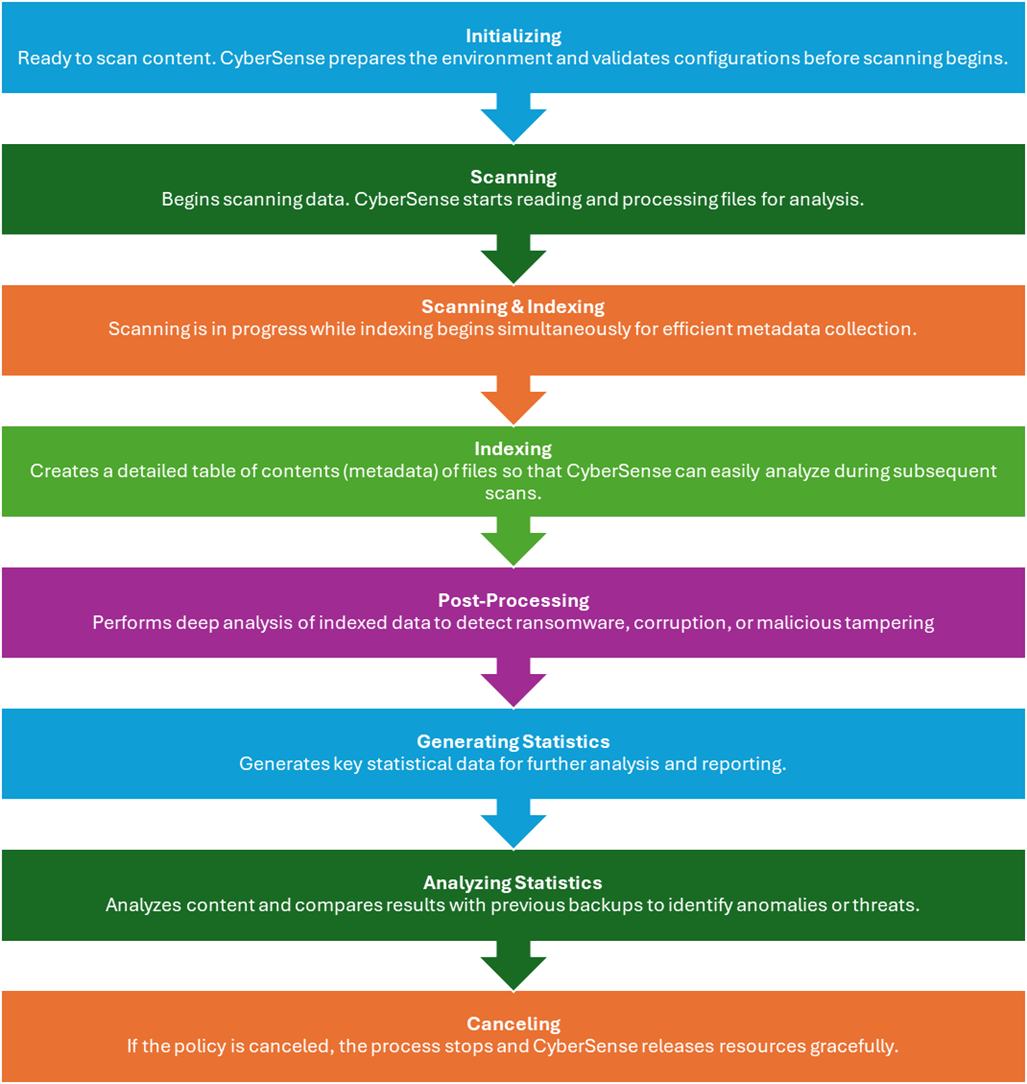
Understanding CyberSense Scan Phases: From Initialization to Analysis
CyberSense plays a crucial role in identifying data corruption, ransomware threats, and malicious tampering by scanning and analyzing backup data. To perform this function effectively, CyberSense follows a structured sequence of phases during a policy scan. Each phase contributes to the overall health check and integrity analysis of your backup content.
Below are the detailed overview of each scan phase and its purpose:
1. Initializing
The policy job has successfully mounted the volume or checked the local file system and is ready to scan the content.
2. Scanning
The policy job has begun scanning the specified location for files and directory content that should be indexed. This includes finding files that have not be scanned yet. The duration depends on the number of files to be scanned.
3. Scanning & Indexing
The Scanning and Indexing job phases may overlap when the scanning process is still in process and the indexing process begins.
4. Indexing
The eligible data in the specified location are processed and indexed. CyberSense adds file metadata needed for analysis to the index segment. The duration depends on the number of files that are to be scanned.
5. Post-Processing
The policy job is optimizing the index segments. The duration depends on the number and size of the index segments.
6. Generating Statistics
This phase indicates that CyberSense has begun generating statistics for analysis. The duration depends on the number of new directories and files in those backups.
7. Analyzing Statistics
CyberSense has begun to analyze the content and compare it to previous backups. This process determines if a potential malware attack has taken place.
8. Canceling
It indicates that the policy job has been canceled before it was completed.
Conclusion
Understanding these phases provides useful insight into how CyberSense operates during a policy scan. Each step is designed to ensure a comprehensive, intelligent, and efficient analysis of backup data, helping organizations stay ahead of potential cyber threats.
#DataProtection