Can someone explain what is meant here ?
How can i verify an HDP page is formated ?
Is it OPE_RATE 100 ?
Can we manualy force pre-format to avaid formatting delay ?
SN does not allow to chose format or quick format.
raidcom default does not allocate all pages at creating time.
root@svsan02p:/u01/app/san/scripts/HDS# raidcom get
ldev -ldev_id 378 -I2450
Serial# : 359069
LDEV : 378 VIR_LDEV : 378
SL : 0
CL : 0
VOL_TYPE : OPEN-V-CVS
VOL_Capacity(BLK) : 8388608000
NUM_PORT : 12
PORTs : CL4-E-17 25 zrh-h8032 : CL4-A-17 25 zrh-h8032
: CL3-A-17 25 zrh-h8032 : CL3-E-17 25 zrh-h8032 : CL4-E-18 25 zrh-h8033 :CL4-A-18 25 zrh-h8033 : CL3-A-18 25 zrh-h8033 : CL3-E-18 25 zrh-h8033 : CL4-E-124 zrh-h8033_2 : CL4-A-1 24 zrh-h8033_2 : CL3-A-1 24 zrh-h8033_2 : CL3-E-1 24zrh-h8033_2
F_POOLID : NONE
VOL_ATTR : CVS : HDP
B_POOLID : 0
LDEV_NAMING : zrh-h8032_4000_378
STS : NML
OPE_TYPE : RBL
OPE_RATE : 100
MP# : 0
SSID : 000B
Used_Block(BLK) : 6504271872
FLA(MB) : Disable
RSV(MB) : 0
CSV_Status : DISABLED
CSV_PROGRESS(%) : -
CSV_Mode : DISABLED
CSV_PROCESS_MODE : -
DEDUPLICATION_DATA : DISABLED
ALUA : Disable
RSGID : 1
PWSV_S : -
root@svsan02p:/u01/app/san/scripts/HDS#
found this from CCI Ref manual ...
FMT:
Formatting
QFMT:
Quick formatting CCOPY:
Data copying (Correction copy / Copy back / Drive copy / Dynamic
CACCS:
Accessing to collections
NONE:
Not in operation
SHRD:
Shredding
ZPD:
Page discarding
SHRPL:
Deleting from the pool
RLC:
Pool relocating
RBL:
Pool rebalancing
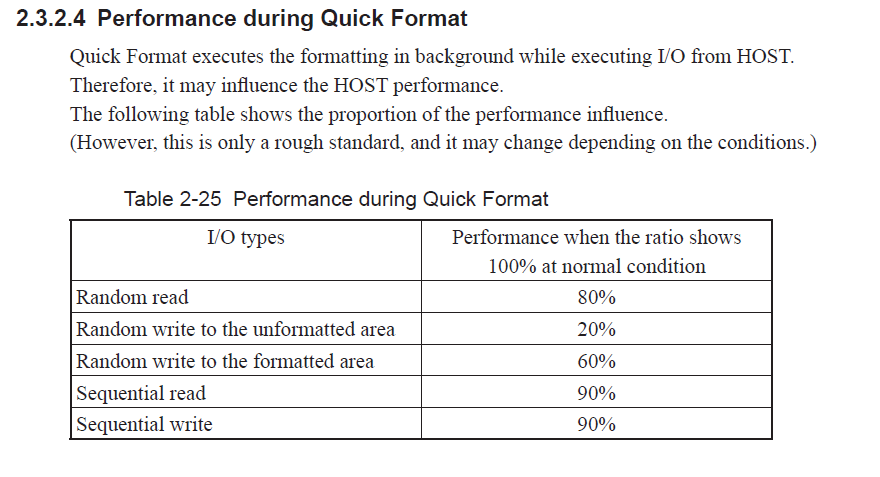
Below an extract from Gx00 Theory of Operation Manual.
For HDP, it formats pages of 42MB.
#ObjectStorage#HitachiVirtualStoragePlatformVSP