Dima Ltda.
Original Message:
Sent: 05-05-2026 11:05
From: Mark Perino
Subject: Questions about integrating VSP with the Veeam BFSS plugin
Your Linux example shows that sdf is only seen by one HBA. So when you re-installed with windows the same behavior occurs (The LDEV is only on one port/path). It appears that you have only mapped LDEV 157 to port 4A, and not Port 3A.
[root@localhost ~]# raidcom get ldev -ldev_id 157 -I3
LDEV: 157
SL: 0
CL: 0
VOLUME TYPE: OPEN-V-CVS
Volume capacity (BLK): 12884901888
NUMBER OF PORTS: 1
PORTS: CL4-A-10 0 VBR_ML350
You may find the Provisioning Options helpful:
https://docs.hitachivantara.com/r/en-us/mk-90rd7010/latest/provisioning-operations-with-cci/provisioning-operations-that-can-be-performed-on-device-groups/operation-method
Add the LDEV to the other port, rescan on the host, and it should create a multipath device to the LUNs.
------------------------------
Mark Perino
Hitachi Vantara
------------------------------
Original Message:
Sent: 05-04-2026 19:57
From: Rosembert Avila
Subject: Questions about integrating VSP with the Veeam BFSS plugin
Hello, thank you for your replies.
This is the Linux proxy configuration.
Multipath:
[root@ml350 /]# cat /etc/multipath.conf
defaults {
usernames yes
find_multipaths yes
}
blacklist {
}
devices {
device {
vendor "HITACHI"
product "OPEN.*"
path_grouping_policy multibus
path_checker tur
path_selector "round-robin 0"
immediate recovery
queue no_path_retry
}
}
Normal volumes provisioned by the storage array are enabled with multipath.
[root@ml350 /]# multipath -ll
mpatha (3600..) dm-3 HITACHI,OPEN-V
size=1.5T features='1 queue_if_no_path' hw_driver='0' wp=rw
`-+- policy='round-robin 0' priority=1 state=active
|- 1:0:1:1 sdb 8:16 active ready running
`- 2:0:1:1 sdd 8:48 active ready running
mpathb (3600..) dm-4 HITACHI,OPEN-V
size=6.0T features='1 queue_if_no_path' hw_driver='0' wp=rw
`-+- policy='round-robin 0' priority=1 status=active
|- 1:0:1:2 sdc 8:32 active ready running
`- 2:0:1:2 sde 8:64 active ready running
When Veeam starts executing the job, it mounts a volume, but it does so normally.
[root@ml350 /]# lsblk
MAJOR NAME:MIN RM SIZE RO TYPE MOUNT POINTS
sda 8:0 0 4.9T 0 disk
├─sda1 8:1 0 600M 0 partition /boot/efi
├─sda2 8:2 0 1G 0 partition /boot
└─sda3 8:3 0 4.9T 0 partition
├─rhel-root 253:0 0 70G 0 lvm /
├─rhel-swap 253:1 0 4G 0 lvm [SWAP]
└─rhel-home 253:2 0 4.8T 0 lvm /home
sdb 8:16 0 1.5T 0 disk
└─mpatha 253:3 0 1.5T 0 mpath
└─vg_backup-lv_backup 253:6 0 1.5T 0 lvm /repository
sdc 8:32 0 6T 0 disk
└─mpathb 253:4 0 6T 0 mpath
└─mpathb1 253:5 0 6T 0 part
sdd 8:48 0 1.5T 0 disk
└─mpatha 253:3 0 1.5T 0 mpath
└─vg_backup-lv_backup 253:6 0 1.5T 0 lvm /repository
from 8:64 0 6T 0 disk
└─mpathb 253:4 0 6T 0 mpath
└─mpathb1 253:5 0 6T 0 part
sdf 8:80 0 6T 0 disk
└─sdf1 8:81 0 6T 0 part
While the backup is running, check the ldev AUX file created by Veeam. As mentioned, it only uses one port, in this case CL4-A.
[root@localhost ~]# raidcom get ldev -ldev_id 157 -I3
LDEV: 157
SL: 0
CL: 0
VOLUME TYPE: OPEN-V-CVS
Volume capacity (BLK): 12884901888
NUMBER OF PORTS: 1
PORTS: CL4-A-10 0 VBR_ML350
F_POOLID: NONE
VOLUME ATTRIBUTES: CVS: QS: HDP: DRS
CMP:-
EXHIBITION SPACE:-
B_POOLID: 0
S_POOLID: 0
LDEV NAME: VeeamAUX_0003,003_20260504141302
STS: NML
D_PM: - D_PM(%) : -
OPE_TYPE : RBL
OPE_RATE : 100
MP#: 0
ASSIGNED_MP# : 1
SSID: 0004
Used_Block(BLK) : 6290092032
FLA(MB) : Disabled
RSV(MB) : 0
CSV_Status : ENABLED
CSV_PROGRESS(%) :-
CSV_Mode : DEDUP+COMPRESS
COMPRESSION_ACCELERATION : DISABLED
COMPRESSION_ACCELERATION_STATUS : DISABLED
CSV_PROCESS_MODE : ONLINE
DEDUPLICATION_DATA : ENABLED
ALUA: Disabled
RSGID: 2
PWSV_S: -
CL_MIG : N
What I did was reinstall the proxy server with Windows, and then I enabled the MPIO feature.
Then I provisioned a test volume, which is correctly recognized by both paths.
From Veeam, I ran a storage rescan and then launched the job, which started without problems.
When I checked in Disk Manager, the LUN appeared correctly mapped. However, when checking the volume status from the MPIO settings, it showed the following:
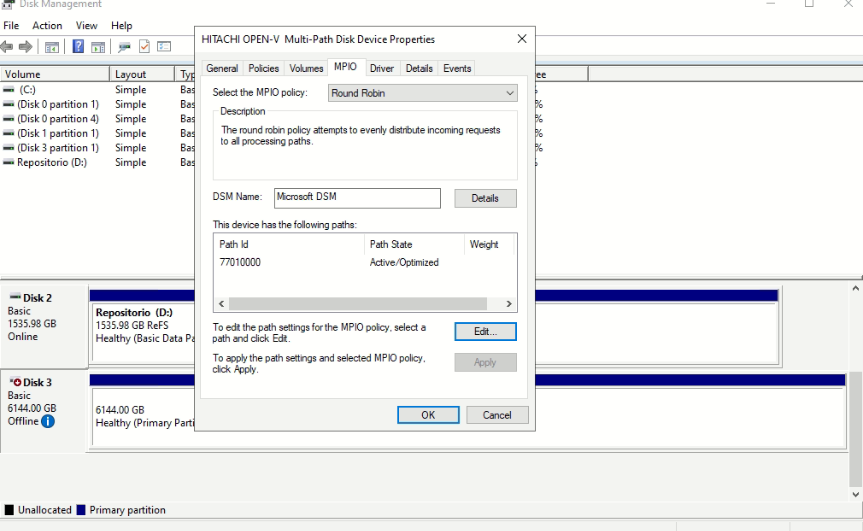
When reviewing LDEV, it is observed that it exhibits the same behavior as when Linux was used, since the volume is only provisioned by a single port and not by both paths.
[root@localhost ~]# raidcom get ldev -ldev_id 151 -I3
LDEV : 151
SL : 0
CL : 0
VOL_TYPE : OPEN-V-CVS
VOL_Capacity(BLK) : 12884901888
NUM_PORT : 1
PORTs : CL4-A-10 0 VBR_ML350
F_POOLID : NONE
VOL_ATTR : CVS : QS : HDP : DRS
CMP : -
EXP_SPACE : -
B_POOLID : 0
S_POOLID : 0
LDEV_NAMING : VeeamAUX_0003,003_20260504235338
STS : NML
D_PM : -
D_PM(%) : -
OPE_TYPE : NONE
OPE_RATE : 100
MP# : 0
ASSIGNED_MP# : 1
SSID : 0004
Used_Block(BLK) : 6404235264
FLA(MB) : Disable
RSV(MB) : 0
CSV_Status : ENABLED
CSV_PROGRESS(%) : -
CSV_Mode : DEDUP+COMPRESS
COMPRESSION_ACCELERATION : DISABLED
COMPRESSION_ACCELERATION_STATUS : DISABLED
CSV_PROCESS_MODE : INLINE
DEDUPLICATION_DATA : ENABLED
ALUA : Disable
RSGID : 2
PWSV_S : -
CL_MIG : N
Best Regards.
------------------------------
Rosembert Avila
Dima Ltda.
Original Message:
Sent: 05-04-2026 16:21
From: David Jontow
Subject: Questions about integrating VSP with the Veeam BFSS plugin
Hello Rosembert!
There could be a few reasons for this. One thing to check as Arnoud mentioned is that the pathing on the proxy could be the issue. However, here is note from Veeam documentation:
"Multipathing for Linux-based backup proxies in Direct SAN access mode only leverage path failover and not load balancing."
(src: https://bp.veeam.com/vbr/3_Build_structures/B_Veeam_Components/B_backup_proxies/vmware_proxies.html )
If you have access to Hitachi Vantara Knowledge, here is link to a solution that includes links to best practice documentation to aid you.
If there is a failure message when port 4A is disabled, please let us know it.
------------------------------
David Jontow
Hitachi Vantara