What is DRS no-ADR Volume?
A DRS no-ADR volume is a specialized storage volume in Hitachi VSP One BHE systems that supports Thin Image Advanced (TIA) pair operations (along with Shadow Image and remote replication products) but does not apply capacity saving features such as compression or deduplication.
DRS no-ADR volume has the capability to enable control data (metadata) to be aware of data management of the Redirect-on-Write (ROW) snapshot function.
While working with DRS no-ADR volumes, a temporary increase in pool usage capacity is expected, which should be considered during capacity planning.
Managing DRS no-ADR Volume
|
#
|
Volume operation
|
Raidcom syntax (Only major options are described here)
|
|
1
|
Volume creation
|
raidcom add ldev -pool {<pool ID#> | <pool naming>} {-ldev_id <ldev#> | -ldev_id auto [-resource_id <resource group id>]} -capacity <size> [-mp_blade_id <mp#>] -capacity_saving {disable | compression | deduplication_compression} –drs -capacity_saving_mode {post_process | inline} -request_id auto
• To create a DRS volume, the options -capacity_saving and –drs are required.
• Maximum number of volumes can be created is 65,536.
Example:
raidcom add ldev -pool 0 -ldev_id 1000 -capacity 100G -capacity_saving disable -drs -request_id auto
|
|
2
|
Volume attribute change
|
raidcom modify ldev -ldev_id <ldev#> -mp_blade_id <mp#> | -capacity_saving {disable | compression | deduplication_compression} | -capacity_saving_mode {post_process | inline} | -request_id auto
Hitachi VSP One BHE systems allow conversion between volume types, giving flexibility to adapt to workload needs:
• Convert LDEV from DRS Compression/DRS Deduplication + Compression to DRS no-ADR
raidcom modify ldev -ldev_id <ldev#> -capacity_saving disable
• Convert LDEV from DRS no-ADR to DRS Compression
raidcom modify ldev -ldev_id <ldev#> -capacity_saving compression
• Convert LDEV from DRS no-ADR to DRS Deduplication + Compression
raidcom modify ldev -ldev_id <ldev#> -capacity_saving deduplication_compression
Note: If the capacity saving setting of DRS volume is changed from DRS Compression/DRS Deduplication + Compression to DRS no-ADR, the compressed or deduplicated data written before the setting change will remain, so the data reduction effect from compression and deduplication processing may still persist.
|
|
3
|
Volume check
|
raidcom get ldev –ldev_id <ldev#>
When the attribute VOL_ATTR includes the character string “DRS”, the LDEV is a DRS volume.
CSV_Mode shows the capacity saving setting.
o DISABLED: Capacity saving is disabled.
o COMPRESS: Compression is enabled.
o DEDUP+COMPRESS: Deduplication and compression are enabled.
Example:
raidcom get ldev -ldev_id 1000
|
|
4
|
Volume map
|
FC configuration:
raidcom add lun -ldev_id <ldev#> -port <port> [<host group name>]
Example:
raidcom add lun -ldev_id 1000 -port CL5-B 5B-G00
NVMe over FC/TCP configuration:
raidcom add namespace -nvm_subsystem_id <nvm subsystem id> {-ns_id <ns#> | -ns_id auto} -ldev_id <ldev#> -request_id auto
Example:
raidcom add namespace -nvm_subsystem_id 10 -ns_id 101 -ldev_id 101 -request_id auto
raidcom get namespace -nvm_subsystem_id 10
|
|
5
|
Volume unmap
|
FC configuration:
raidcom delete lun -ldev_id <ldev#>-port <port> [<host group name>]
Example:
raidcom delete lun -ldev_id 1000 -port CL5-B 5B-G00
NVMe over FC/TCP configuration:
raidcom delete namespace -nvm_subsystem_id <nvm subsystem id> {-ns_id <ns#> } -request_id auto
Example:
raidcom delete namespace -nvm_subsystem_id 10 -ns_id 101 -request_id auto
raidcom get namespace -nvm_subsystem_id 10
|
|
6
|
Volume delete
|
raidcom delete ldev -ldev_id <ldev#> -operation initialize_capacity_saving
Example:
raidcom delete ldev -ldev_id 1000 -operation initialize_capacity_saving
|
Where can DRS no-ADR volume be used?
DRS no-ADR volumes are best suited for workloads where capacity savings are minimal (around 0-10%), but TIA functionality is required:
- Database environments: When compression ratios are low, snapshot operations via TIA are critical.
- Virtualization platforms: Stable performance with snapshot management, without ADR overhead.
- Backup and recovery systems: TIA pairs allow efficient snapshot handling, even if compression savings are negligible.
- High performance applications: Where ADR’s adaptive behavior could introduce latency, no-ADR ensures consistent throughput.
Capacity Savings Setting Selection for DRS Volume Configuration
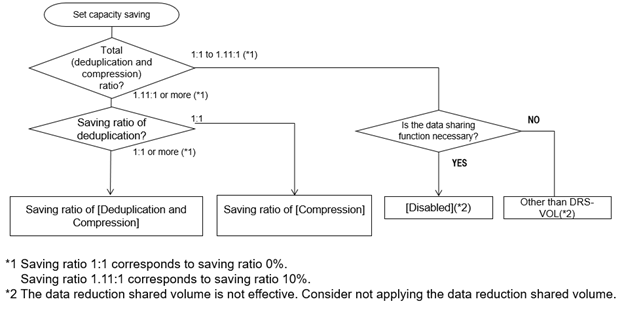
Figure 1: From Engineering documentation, selecting the appropriate capacity savings setting for DRS volumes
Benefits
- Significantly improved performance.
- TIA compatibility: Supports advanced snapshot operations.
- Flexibility: Conversion between compression/deduplication and disabled modes is supported.
- Provides Enhanced performance in OLTP, and customer reference environments.
#VSPOneBlock#VSPOneBlockHighEnd#VSPOneBlock80Series#FlashStorage#CommandControlInterface#VSPOneBlockManagementSoftware