Introduction
FC-NVMe has become a key protocol in modern enterprise storage due to its high performance and low latency. However, certain environments owing to legacy applications, OS or driver limitations, multipathing needs, or vendor recommendations may still require reverting to SCSI based connectivity. This article provides a concise, professional guide to perform FC-NVMe cleanup and switching storage ports from FC-NVMe to FC-SCSI, ensuring smooth host discovery of LUNs and uninterrupted operations.
FC-SCSI versus FC-NVMe
FC-SCSI
Fibre Channel – Small Computer System Interface (FC-SCSI) is the traditional approach for transporting SCSI commands over the Fibre Channel Protocol (FCP) across high-speed Fibre Channel networks.
Because of its layered architecture and limited queue depth, FC-SCSI introduces comparatively higher latency and increased CPU usage per I/O, though it still delivers reliable performance.
It supports DM-Multipathing or Native Multipathing and is widely compatible with all operating systems, applications, and hypervisors.
FC-NVMe
Fibre Channel – Non-Volatile Memory Express (FC-NVMe) is a modern protocol that transports NVMe commands over Fibre Channel, extending the performance benefits originally designed for PCIe-attached NVMe SSDs across the Fibre Channel network.
It delivers significantly lower latency, is optimized for flash, and supports highly parallel I/O with up to 65K queues, enabling substantial scalability and higher throughput.
FC-NVMe leverages efficient NVMe-based multipathing, and while support is steadily increasing across platforms, some legacy environments may still lack driver’s availability or certification.
Why Convert NVMe to SCSI?
Engineers may opt to transition from FC-NVMe to FC-SCSI for various operational, compatibility, and stability reasons. Common scenarios include:
- OS or driver limitations where the current environment does not fully support or reliably maintain NVMe connectivity.
- Multipath requirements, as many Linux distributions provide more mature and predictable behavior with DM-Multipath on SCSI devices.
- Boot LUN dependencies, where SCSI remains the preferred and more stable option for system boot volumes.
- HBA firmware or compatibility issues that impact NVMe performance or stability over Fibre Channel.
- Protocol standardization, ensuring consistency across similar hosts, clusters, or application environments
Performing an NVMe cleanup before switching ensures that all stale namespace, subsystem entries, and device mapping are removed, preventing conflicts and enabling a clean transition to the new SCSI-based configuration.
What is NVMe Cleanup?
NVMe cleanup refers to the complete removal of all the NVMe-related entries from the host, including:
- NVMe namespace path
- NVMe namespaces
- NVMe subsystem ports
- Associated HBA WWNs
- Host NQNs
- NVMe subsystems
- Device nodes under /dev/nvme*
This cleanup ensures the host is fully prepared for new SCSI port mapping and prevents issues such as duplicate path presentations, lingering NVMe references, or multipath conflicts.
Prechecks Before Performing Cleanup
Before starting the cleanup, ensure that the `HORCM` configuration file is updated with the correct storage system’s SVP IP address and that the storage system is properly defined on the CCI management server. This ensures the `horcm` instance can start without issues.
Use the following commands to verify and start the HORCM instance:
# ps -eaf | grep horcm
# horcmstart.sh <horcm_instance>
NOTE: Ensure that no I/O is running on the storage system and unmount all storage devices on the host before performing any configuration changes for the cleanup.
Step-by-step NVMe Cleanup Procedure
Pre-Cleanup Validation Steps
1. Verify whether the `horcm` instance is running.
Syntax: To list all `horcm` instance running on CCI server, use the following CCI command:
# ps -eaf | grep horcm

2. Start the `horcm` instance if it is not already running for the storage system where the cleanup is required.
Syntax: To start a specific `horcm` instance, use the following CCI command:
# horcmstart.sh <horcm_instance>

3. Verify that the PORT_MODE is set to NVMe on ports that need to be converted to SCSI.
Syntax: To check whether a port is operating in NVMe mode, use the following CCI command:
# raidcom get port -key detail -<horcm_instance> | awk '$1~/CL7-F|CL8-F/'

4. Identify all the NVM subsystem IDs and determine which subsystems contain the ports that require conversion.
Syntax: To list all NVM subsystems configured on the storage system, use the following CCI command:
# raidcom get nvm_subsystem -key opt -<horcm_instance>

5. Check each NVM subsystem to determine which one contains the target ports and note the subsystem ID for later steps.
Syntax: To view the ports associated with a specific NVM system, use the following CCI command:
# raidcom get nvm_subsystem_port -nvm_subsystem_id <subsystem_id> -<horcm_instance>

6. Retrieve the list of all namespaces associated with the NVM subsystem ID that contains the target ports.
Syntax: To list all namespaces within a specific NVM subsystem, use the following CCI command:
# raidcom get namespace -nvm_subsystem_id <subsystem_id> -<horcm_instance>
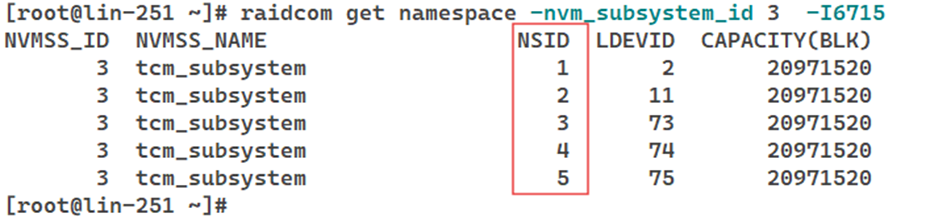
7. Obtain the HOST NQN associated with the identified NVM subsystem ID.
Syntax: To retrieve the HOST NQN, use the following CCI command:
# raidcom get host_nqn -nvm_subsystem_id <subsystem_id> -<horcm_instance>

8. Retrieve the list of all namespace paths associated with the identified namespace.
Syntax: To display all the namespace path, use the following CCI command:
# raidcom get namespace_path -nvm_subsystem_id <subsystem_id> -<horcm_instance>

9. Retrieve the HBA WWN associated with each of the identified target ports.
Syntax: To obtain the HBA WWN information, use the following CCI command:
# raidcom get hba_wwn -port <storage_port> -<horcm_instance>
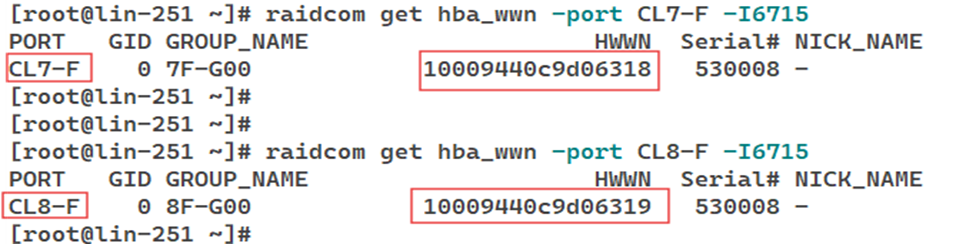
Begin NVMe Cleanup Process
10. Remove the HOST NQN from the namespace paths identified in Step 8.
Syntax: To remove the HOST NQN associated with a specific namespace path, use the following CCI command:
# raidcom delete namespace_path -nvm_subsystem_id <subsystem_id> -ns_id <namespace_id> -host_nqn <hostNQN> -request_id auto -<horcm_instance>

NOTE: After executing the delete command, a Request ID is generated. To confirm that the removal was successful, check the command status using this Request ID.
If the Description field in the output shows a “-”, it indicates that the command completed successfully, as shown in the example below.

11. Remove all the namespaces associated with the NVM subsystem ID identified in Step 6.
Syntax: To delete all the namespaces from the specified NVM subsystem, use the following CCI command:
# raidcom delete namespace -nvm_subsystem_id <subsystem_id> -ns_id <namespace_id> -request_id auto -<horcm_instance>

12. Remove the target ports associated with the NVM subsystem ID identified in Step 5.
Syntax: To delete a target port from the NVM subsystem, use the following CCI command:
# raidcom delete nvm_subsystem_port -nvm_subsystem_id <subsystem_id> -port <target_port> -request_id auto -<horcm_instance>

13. Remove the HBA WWN associated with the target ports identified in Step 9.
Syntax: To delete the HBA WWN from the target ports, use the following CCI command:
# raidcom delete hba_wwn -port <target_port> -hba_wwn <hba_wwn> -<horcm_instance>

14. Remove the HOST NQN associated with the NVM subsystem ID identified in Step 7.
Syntax: To delete the HOST NQN from the NVM subsystem, use the following CCI command:
# raidcom delete host_nqn -host_nqn <host_nqn_id> -nvm_subsystem_id <subsystem_id> -request_id auto -<horcm_instance>

15. Finally, delete the NVM subsystem ID identified in Step 4, after confirming that all the previous cleanup steps have been completed successfully.
Syntax: To remove the NVM subsystem ID, use the following CCI command:
# raidcom delete nvm_subsystem -nvm_subsystem_id <subsystem_id> -request_id auto -<horcm_instance>

Begin Port Conversion from NVMe to SCSI
With the NVMe cleanup successfully completed in the previous steps, proceed to convert the target ports from NVMe mode to SCSI mode. Before converting, verify from Step 3 that the ports are still operating in NVMe mode.
Syntax: To change the port mode from NVMe to SCSI, use the following CCI command below:
# raidcom modify port -port <target_port> -port_mode scsi -request_id auto -<horcm_instance>
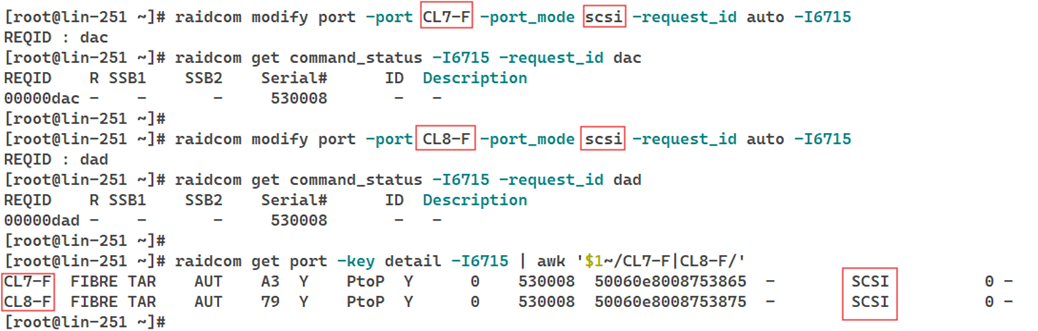
The NVMe cleanup and port conversion have been successfully completed, as confirmed in the output shown in the screenshot above.
Shutdown the `horcm` instance after completing the cleanup and port conversion.
Syntax: To stop the `horcm` instance, use the following CCI command:
# horcmshutdown.sh -<horcm_instance>

Conclusion
Converting a host’s storage connectivity from NVMe to SCSI is a common but important task in environments that prioritize stability and compatibility over maximum performance. Performing a thorough NVMe cleanup and coordinating closely with the storage team ensures a smooth and risk-free transition. By following the steps in this guide, Engineers can efficiently manage protocol changes and maintain a reliable, well-structured storage environment.